
When a business alarm fails, the first few minutes matter. A silent or constantly beeping system leaves your premises exposed and your team unsure what to do. This guide walks Perth business owners through sensible first steps, from simple checks to knowing when to call in professionals.
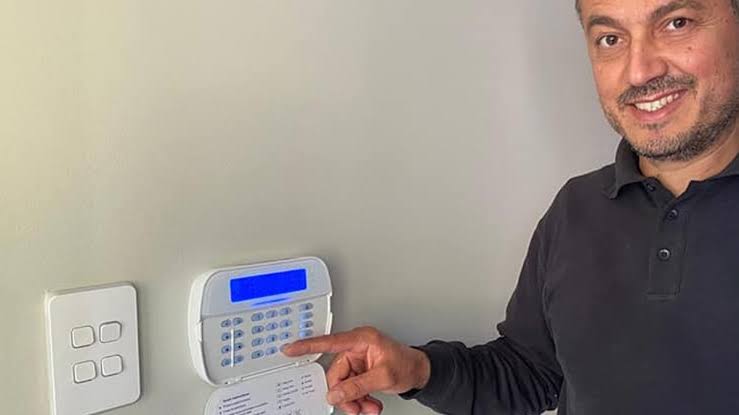
Start with the simplest causes. A flat backup battery, a loose connection or a recent power outage can all trigger faults, and the keypad usually displays a message or code. Write down exactly what it says before you press anything, because that detail helps any technician diagnose the problem quickly.
Next, check whether the fault affects the whole system or one zone. A single door contact or motion sensor that keeps tripping points to a local issue, while a complete failure suggests the control panel or power supply. Note the time and what was happening when it started.
Keep your premises protected meanwhile
An alarm that is not working leaves a gap in your protection. Until it is fixed, make sure doors and windows are locked, valuables are stored securely and lights are working around entrances. Simple habits like these reduce the opportunity for theft while you wait for repairs.
Tell your staff what has happened and what to do differently. Someone should be responsible for locking up and checking the premises at the end of each day. Clear instructions prevent confusion and make sure nobody assumes the alarm is still watching over the building.
When to call a technician
Some faults are beyond a quick check. If the panel keeps showing the same error, the siren will not stop or sensors fail repeatedly, it is time to book professional Perth alarm repairs rather than guessing. A technician can test the whole system and replace worn parts safely.
Avoid opening the control panel yourself or rewiring components. Alarm systems connect to mains power and backup batteries, and a wrong move can make the problem worse or cause injury. Leave testing and replacement work to people trained to do it properly.
Have your details ready when you call. Know the make and model if you can, describe the fault codes you wrote down, and mention when the system was last serviced. The more information you provide, the faster a technician can arrive prepared with the right parts.
Questions to ask about a repair
Before agreeing to any work, ask what the likely cause is and how long the repair will take. A clear answer shows the provider understands your system. If the fault is old equipment, ask whether repair or replacement makes better financial sense over the next few years.
Ask about warranties on parts and labour as well. Knowing what is covered protects you if the same fault returns shortly after. Get the quote and scope of work in writing so there are no surprises when the invoice finally arrives at your office.
Check your insurance and records
Review your insurance policy to see whether it requires a working alarm. Some policies set conditions around security systems, and a failed alarm could affect a claim. Contact your insurer early if repairs will take several days, and keep a record of every conversation.
Keep a simple log of faults, repairs and service dates. This record helps technicians spot repeated problems and gives you evidence if you need to show your insurer the system was maintained. A shared document or notebook near the panel works well.
Using time well while you wait
Waiting for repairs is a good moment to review how your business runs day to day. Many owners find small jobs pile up, such as logging faults, ordering parts and chasing quotes. Tidying these processes now saves time every time something goes wrong.
Some owners also wonder whether technology could take on routine admin like this. Those who search for an ai consultant perth will find advisers who explain what AI can realistically handle in a small business and where human judgement still matters most.
Whatever tools you choose, start small and test them on one task. A simple checklist for fault reporting or an automatic reminder for servicing can already make life easier. Review how it works after a month before expanding to anything larger.
Preventing future failures
Regular servicing is the best defence against sudden failure. Schedule inspections at least once a year, replace backup batteries before they wear out and test sensors regularly. A system that is looked after is far more likely to work when you really need it.
Test your alarm after any building work or change in layout. Moving shelving, painting or adding new equipment can interfere with sensors. Treat any change to the space as a reason to check that every zone still responds correctly.
Training your team
People are often the weakest link in security. Make sure everyone who opens or closes the premises knows how to arm and disarm the system, what the codes mean and who to contact if something goes wrong. Short, regular refreshers work better than a single long session.
Change access codes whenever a staff member leaves. Old codes that remain active create a risk that is easy to avoid. Keep a list of who holds keys and codes, and review it every few months so nothing slips through unnoticed.
Encourage staff to report small oddities early, such as a sensor that sometimes does not respond or a keypad that feels slow. Early reports often catch problems before they become full failures, and they save the business from a disruptive breakdown at an awkward moment.
A short checklist to keep
Keep a short list near the panel: the fault code, the time it began, your service provider contact and your insurer details. When something goes wrong, you can act calmly instead of searching for information while the alarm continues to sound.
A failed alarm is stressful, but a clear plan makes it manageable. Check the basics, protect the premises, call a qualified technician and keep good records. Taking those steps will help your business recover quickly and reduce the chance of a repeat.